Causely MCP Skills: stop prompt-engineering your reliability agent

Anson McCook
June 3, 2026
TL;DR Causely MCP Skills are pre-built workflows that route your agent to the right tool, ideally in a single call, and return a causal answer, not a telemetry dump. The Causely MCP server already cuts token consumption by 60% compared to raw telemetry tools by returning deterministic causal context. Skills remove the remaining friction: no prompt engineering to pick the right tool, no orchestration to build on your side. Describe your situation; the Skills router handles the rest.
Why does a 25-tool MCP server need Skills?
The Causely MCP server gives agents and AI assistants direct access to Causely’s live causal model — a continuously maintained representation of your environment's services, resources, dependencies, and failure states. Because the causal model encodes service dependencies, resource states, and failure causality, most reliability questions can be answered in a single well-chosen tool call. One call to get_service_summary, one call to get_root_causes, or one call to get_incident_impact . Rather than the multi-step reconstruction, an agent has to perform against raw telemetry.
That’s the baseline Causely establishes. Skills push it further. When a platform engineer or agent builder wires up the MCP server for the first time, they’re looking at 25 tools across five categories. The natural question is: which one do I actually call for this situation? Without guidance, teams end up building the answer themselves — writing system prompts that encode when to call which tool, or prompt-engineering the selection on every query.
Skills eliminate that work entirely. The goal is one prompt, one routed call, one causal answer. For most reliability scenarios — triage an alert, check a deploy, generate a postmortem — that’s exactly what happens. Some complex investigations require a short sequence of calls, but even then Skills handle the sequencing; you don’t.
What are Causely MCP Skills?
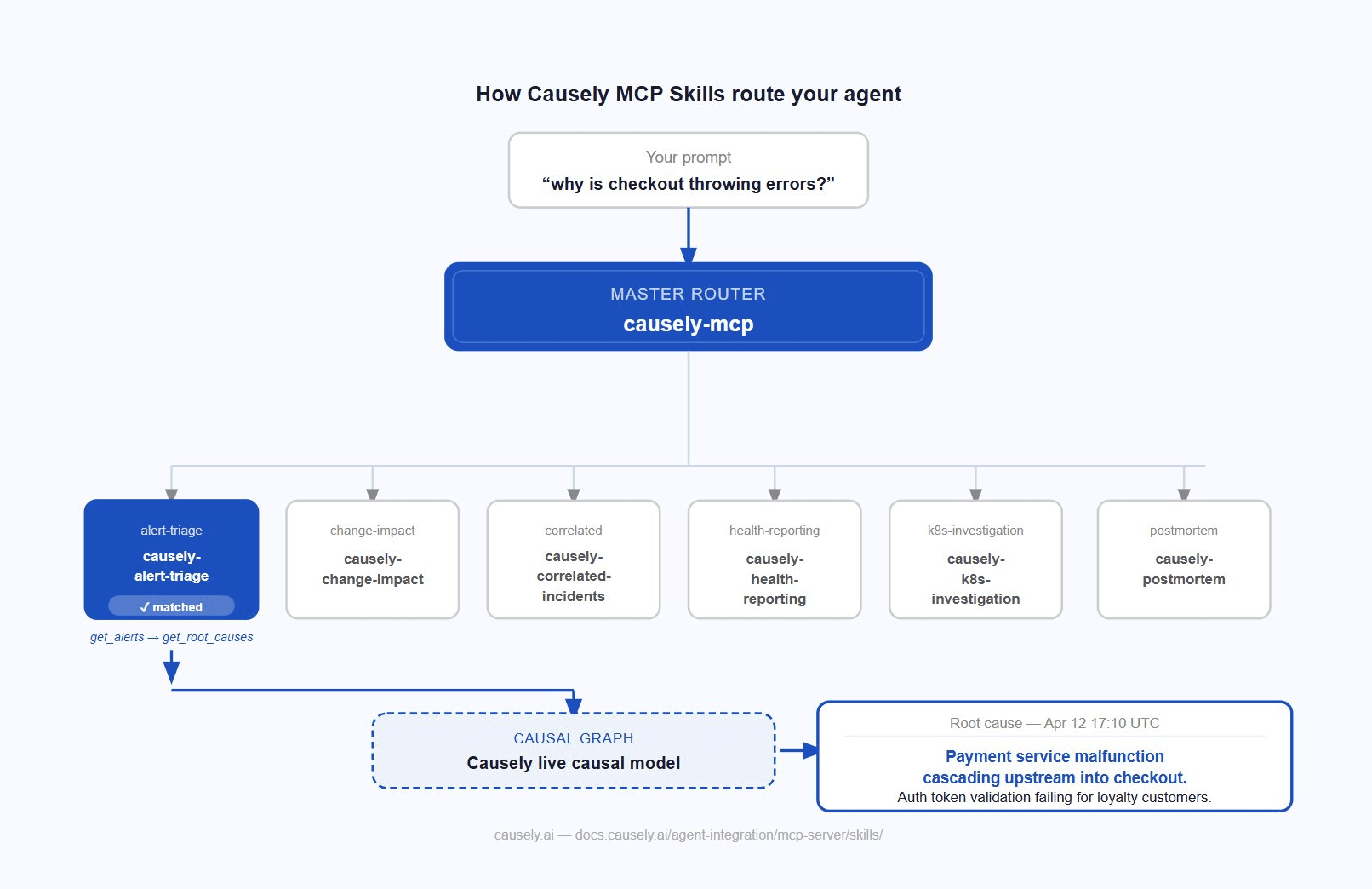
Causely MCP Skills are pre-built routing workflows that sit above the 25 MCP tools. There is one master router — causely-mcp — and six specialist skills, each covering a distinct class of reliability work.
causely-mcp activates on any observability or reliability question, matches the prompt against each specialist’s trigger set, and delegates automatically. You never invoke a specialist directly.
The six specialists and what they cover:
|
Skill |
Activates when you're
asking about |
|
causely-alert-triage |
An incoming alert from
PagerDuty, Datadog, Alertmanager, Slack, or OpsGenie |
|
causely-change-impact |
Whether a recent
deployment, rollout, or config change caused a regression |
|
causely-correlated-incidents |
Multiple services alerting
at once, blast radius, or cascading failures |
|
causely-health-reporting |
Environment health
summaries, SLO status, standup reports, team reliability snapshots |
|
causely-k8s-investigation |
Kubernetes infrastructure
issues: OOMKills, pod restarts, node pressure, CrashLoopBackOff |
|
causely-postmortem |
Generating a structured
postmortem, incident retrospective, or Jira/Linear ticket |
Each specialist runs the correct tool sequence for its scenario. causely-alert-triage, for example, calls get_alerts to fetch the raw alert payload, follows up with get_root_causes to surface the confirmed causal analysis, and maps the result back to the specific alert, without you specifying any of that.
If you want to route to a specific specialist directly, prefix your prompt with the skill name:
use causely-postmortem: write a retrospective for the payment incident on April 25
You can also bypass Skills entirely and call MCP tools directly for explicit programmatic control.
Why Skills compound the token efficiency Causely already provides
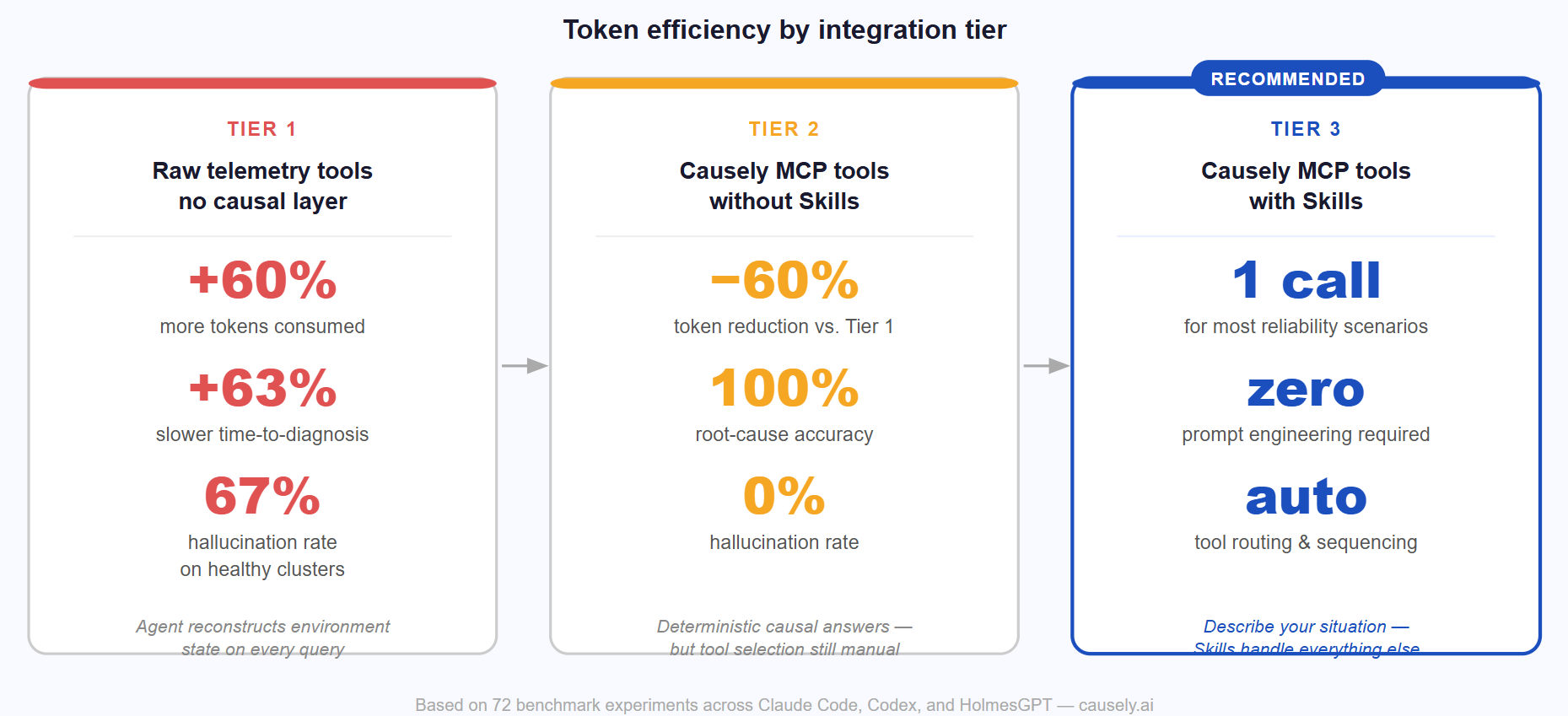
There are three tiers of agent efficiency when it comes to reliability work, and it helps to be explicit about where each one sits.
Tier 1 — Raw telemetry tools with no causal layer
The agent has to reconstruct the environment state from scratch on every query: pull metrics, scan logs, infer topology, correlate signals across services. Benchmarks across 72 experiments measured what this costs: token consumption 60% higher, time-to-diagnosis 63% slower, and hallucinated incidents on healthy clusters at 67%, compared to agents working with Causely’s causal context.
Tier 2 — Causely MCP tools without Skills
The agent has access to deterministic causal answers: named root causes, computed blast radii, live dependency graphs. It doesn’t need to reconstruct anything. That’s where the 60% token reduction comes from. But the agent still has to decide which of 25 tools to call, and may still require prompt engineering to get the selection right.
Tier 3 — Causely MCP tools with Skills
The router handles tool selection. For most scenarios — triage an alert, validate a deploy, generate a postmortem — one prompt produces one routed call and one causal answer. The prompt engineering overhead disappears. This is the target state.
We’ve written about why generic diagnoses break AI ops agents and what named root causes change. Skills are the interface layer that delivers those named causal answers without requiring the agent or the engineer to know which tool surfaces them.
Which clients support Skills today?
Skills are available now in Claude Code, Claude Desktop, and Cursor, with support for more clients on the way.
The Skills repository is also open source. If you’re building a custom reliability agent — a LangGraph workflow, a Claude prompt chain, an internal SRE bot — the Skills are a usable starting point for tool-selection logic and investigation sequencing. Fork, adapt, or reference them directly.
|
Client |
Setup |
|
Claude Code | |
|
Claude Desktop | |
|
Cursor |
For any other MCP-compatible client — JetBrains IDEs, Windsurf, Zed, Kiro CLI, HolmesGPT — point it at https//api.causely.app/mcp to access all 25 MCP tools directly. We published a Cursor plugin last month if you want the full setup context for that client.
FAQ
What are Causely MCP Skills?
Causely MCP Skills are pre-built routing workflows for the Causely MCP server. A master router called causely-mcp sits above six specialist skills covering alert triage, change impact, correlated incidents, health reporting, Kubernetes investigation, and postmortems. You describe your situation in plain language; the router selects the right specialist, which runs the correct tool call sequence and returns a causal answer. No manual tool selection required.
Do I need to know which Skill to invoke?
No. The causely-mcp master router handles delegation automatically based on your prompt. If it picks the wrong specialist, you can override it with use causely-<skill-name>: as a prefix. You can also bypass Skills entirely and call the 25 MCP tools directly if you need programmatic control — the full tool reference covers all parameters.
What’s the difference between using Skills and calling MCP tools directly?
Direct tool calls give you explicit control over every parameter, useful when building a custom agent that needs to chain results programmatically. Skills are the right choice when you want the correct tool sequence for a known scenario (incident triage, post-deploy check, postmortem) without writing the orchestration yourself. Most conversational use cases — investigating an alert, checking post-deploy health, generating a postmortem — are better served by Skills.
Which AI clients support Causely Skills today?
Skills are available in Claude Code, Claude Desktop, and Cursor (one-click plugin or manual setup), with more clients on the way. Any MCP-compatible client can access the full 25-tool MCP server at https://api.causely.app/mcp directly. The Skills repository is also open source — if you’re building a custom agent on top of the Causely MCP, the Skills are a usable starting point for tool-selection logic and investigation sequencing.
How do Skills reduce token consumption?
There are three tiers: raw telemetry tools require multi-step environment reconstruction on every query; Causely MCP tools without Skills return deterministic causal answers that cut token consumption by 60% (measured across 72 benchmark experiments); Causely MCP tools with Skills add routing on top, so most queries resolve in a single call with no prompt engineering required. Each tier compounds the efficiency gain of the one before it.
What to do next
The Skills documentation is at docs.causely.ai/agent-integration/mcp-server/skills/. If you’re on Cursor, the one-click plugin is the fastest path. Claude Code and Claude Desktop setup takes about five minutes via the manual copy-from-repo instructions.
If you want to understand the efficiency case in depth before committing to the integration, the token benchmark post has the full methodology and results from 72 experiments.